A Simple Way to Hide /administrator
Here is a simple way to hide your /administrator path on your server which will work without the need for any plugins,
1. Create a script to set an access cookie
Create a folder in the root of your site e.g. /top-secret and create a file in it called /top-secret/index.php. This file should contain this code:
// Handle sites in sub-folders
$root = dirname(dirname($_SERVER['SCRIPT_NAME']));

// Avoid redirect to //administrator
$root = ($root == "/") ? "" : $root;

$admin_cookie_code="32163455497";
setcookie("JoomlaAdminSessionXXX",$admin_cookie_code, 0, $root . "/");

header("Location: " . $root . "/administrator/index.php");
2. Check the access cookie is set before accessing /administrator
You will need to add additional redirect lines to your site's .htaccess file in the "Custom redirects" section
RewriteEngine On
RewriteCond %{REQUEST_URI} ^/administrator
RewriteCond %{REQUEST_URI} !(restore.php)
RewriteCond %{REQUEST_URI} !(restoration.php)
RewriteCond %{REQUEST_URI} !(extract.php)
RewriteCond %{REQUEST_URI} !(restore_finalisation.php)
RewriteCond %{HTTP_COOKIE} !JoomlaAdminSession=321654987
RewriteRule (.*) /? [R=302,L]
This will allow the Joomla update to work correctly via YourSites whilst blocking access to the /administrator path.
3. Customisation
Remember to change the following variables, values and folder names to match your needs
- Cookie name : JoomlaAdminSession
- Cookie value : 321654987
- Folder name : top-secret
4. Making this more secure
- If your server is running apache then the folder can be a hidden folder e.g. ._top-secret. If you do this then you may need to enable viewing of hidden files in your FTP program if you are unable to find it!
- You could use HTTP Authorization to secure this hidden folder further see this MDN article for more information
5. Using it!
When you need to access /administrator on your site you should access /._top-secret first. The cookie is set to expire at the end of the session so once your browser is closed you will need to access /administrator via /._top-secret again.
6. Support for Direct Login from YourSites
Support for Direct Login from YourSites is now supported but you need to use a slightly different private access script. Make sure you change your secret access script to pass the query string through to the administrator page.
Create a folder in the root of your site e.g. /top-secret and create a file in it called /top-secret/index.php. This file should contain this code:
// If using direct login from YourSites then set the query string as follows
$query = (isset($_SERVER['QUERY_STRING']) && !empty($_SERVER['QUERY_STRING'])) ? '?' . $_SERVER['QUERY_STRING'] : '';

// if you are not using direct login from YourSites then set $query to ''
// $query = '';

// Handle sites in sub-folders
$root = dirname(dirname($_SERVER['SCRIPT_NAME']));

// Avoid redirect to //administrator
$root = ($root == "/") ? "" : $root;

$admin_cookie_code="32163455497";
setcookie("JoomlaAdminSessionXXX",$admin_cookie_code, 0, $root . "/");

header("Location: " . $root . "/administrator/index.php" . $query);
You will also need to configure the site within YourSites to support this. See 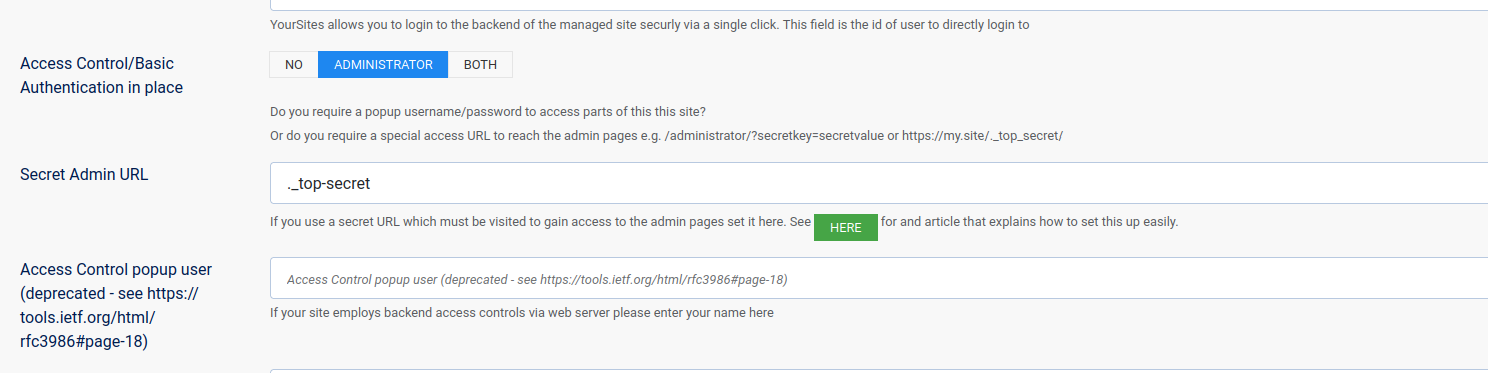
7. .htccess file for sites running in a subfolder
The htccess file needs to be slightly different when the site is installed in a sub-folder. In this case the site is running in the folder /j6raw
RewriteEngine On
	RewriteCond %{REQUEST_URI} ^/j6raw/administrator
	RewriteCond %{REQUEST_URI} !(restore.php)
	RewriteCond %{REQUEST_URI} !(restoration.php)
	RewriteCond %{REQUEST_URI} !(extract.php)
	RewriteCond %{REQUEST_URI} !(restore_finalisation.php)
	RewriteCond %{HTTP_COOKIE} !JoomlaAdminSessionXXX=32163455497
	RewriteRule (.*) /? [R=302,L]